Freicore

Freicore Product / Bearing

Project control built around scope, labour, progress, and commercial truth.

Bearing gives construction subcontractors one structured workflow — from the contract BOQ/WBS through manpower planning, timesheets, and physical progress to progress claims and client payment certification.

One controlled project picture

Replace disconnected spreadsheets with linked operational records.

Bearing connects the contract scope, labour plan, actual hours, physical progress, progress claims (payment applications), and client payment certificates without letting one record silently overwrite another.

Within the Freicore Execution Control System, Bearing is the project-level control layer — and the first part of that system available today as a standalone product.

New to the process? Read the guide: how subcontractors track progress claims.

The three truths

  1. 01 What progress was physically completed?
  2. 02 How many hours were planned, earned, and actually spent?
  3. 03 What has been claimed, and what has the client certified?

Six connected screens

See the Bearing workflow.

Everything below is one demonstration project, mid-execution: a reinforced-concrete frame with a 46-person crew, nineteen weekly progress reports, four payment applications, and the client's real responses. Every screen reads from the same records.

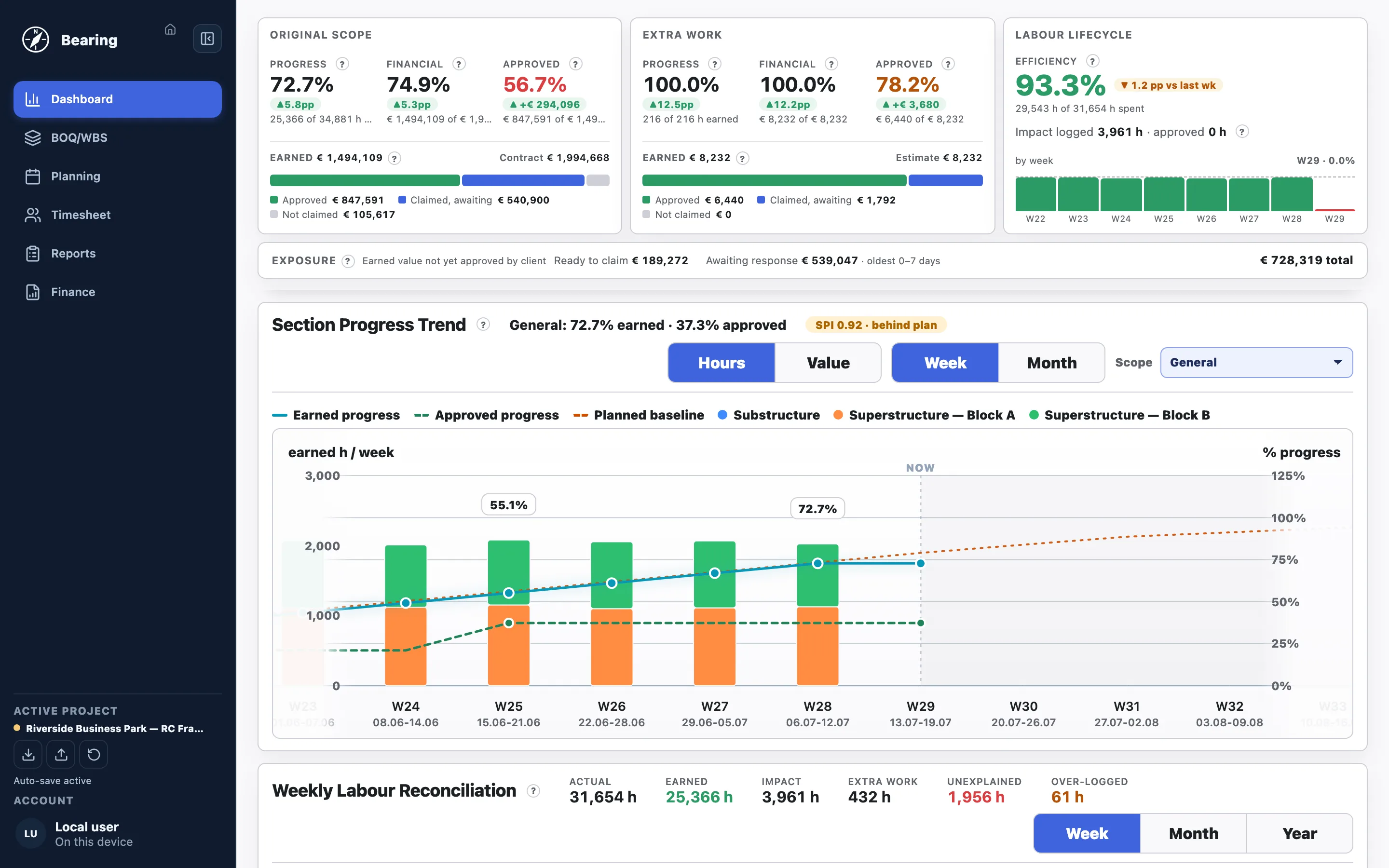
Bearing Dashboard: original scope and extra work KPIs, labour efficiency, commercial exposure, and the section progress trend against the planned baseline
Dashboard. The management picture in one screen: physical progress against the planned baseline, the earned → claimed → approved money funnel, labour efficiency from real timesheets, and how much earned value is still exposed with the client.
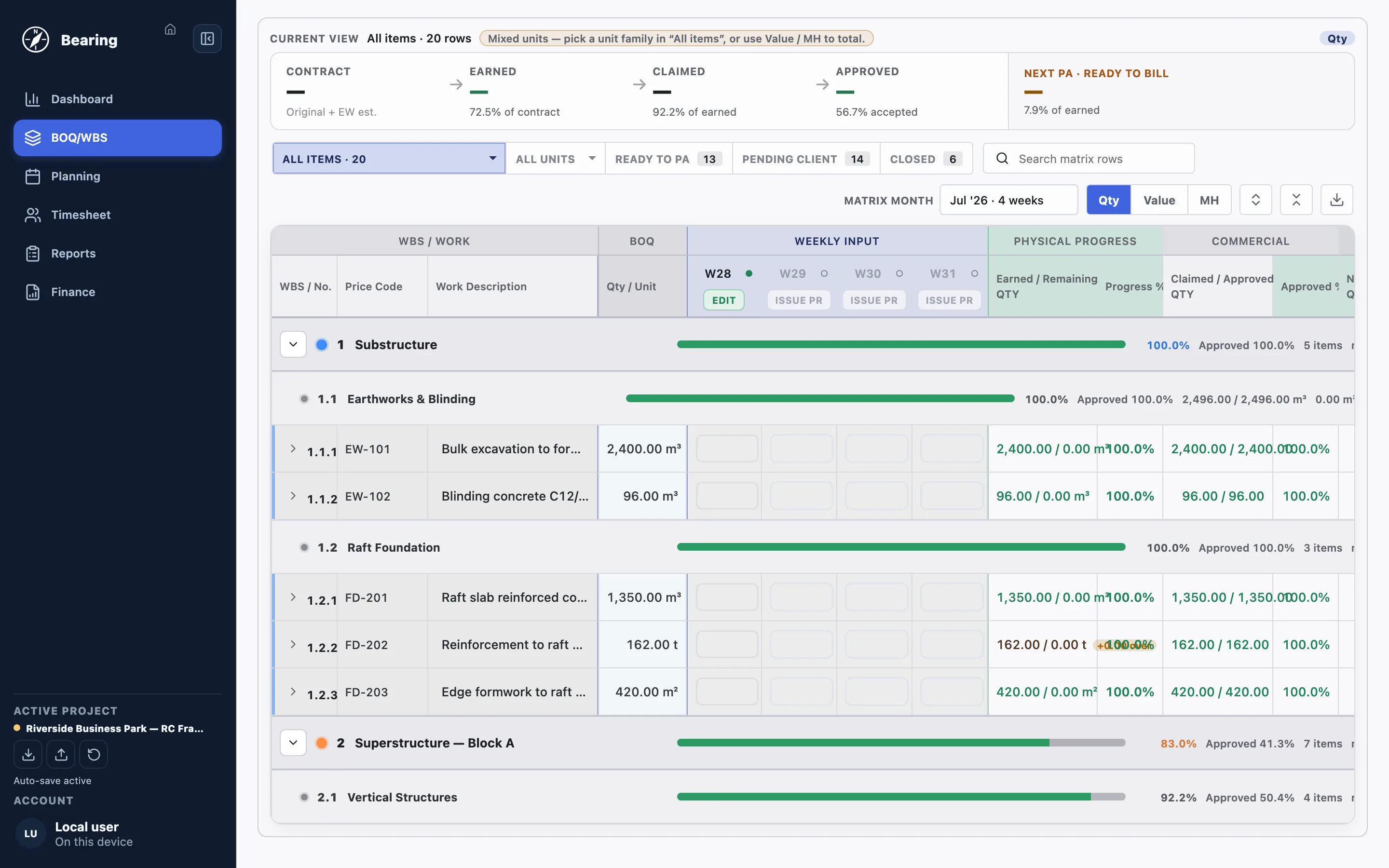
Bearing BOQ/WBS screen: the contract scope as an operational progress matrix with weekly quantity input, physical progress and commercial status per item

BOQ / WBS

The contract scope is the operational matrix.

Import the BOQ from Excel once — then the same structure carries weekly quantities, physical progress, and commercial status for every item.

  • Contract → Earned → Claimed → Approved funnel across the whole scope
  • Weekly quantity input directly on the matrix, week by week
  • Per-item status: Ready for PA, Pending client, Approved — nothing gets lost

Background: What is a BOQ?
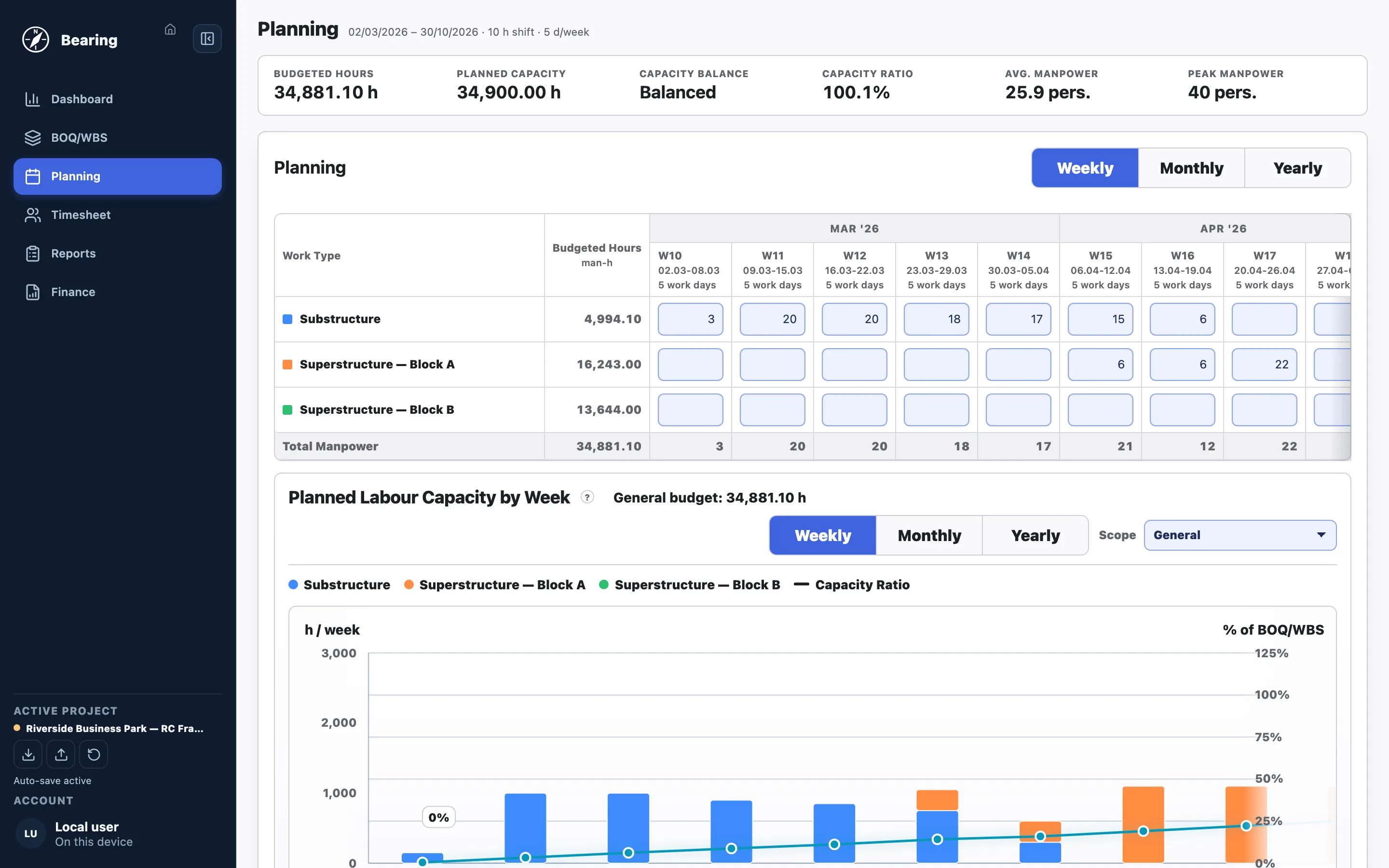
Bearing Planning screen: weekly manpower plan per BOQ section compared against the budgeted labour base

Planning

Plan the crew against the contract labour base.

Weekly manpower per BOQ section, checked against the budgeted man-hours of the scope — so the plan is a number, not a feeling.

  • Capacity ratio shows over- or under-capacity before it happens
  • Weekly, monthly, and yearly views of the same plan
  • Planned labour capacity charted against the BOQ/WBS budget
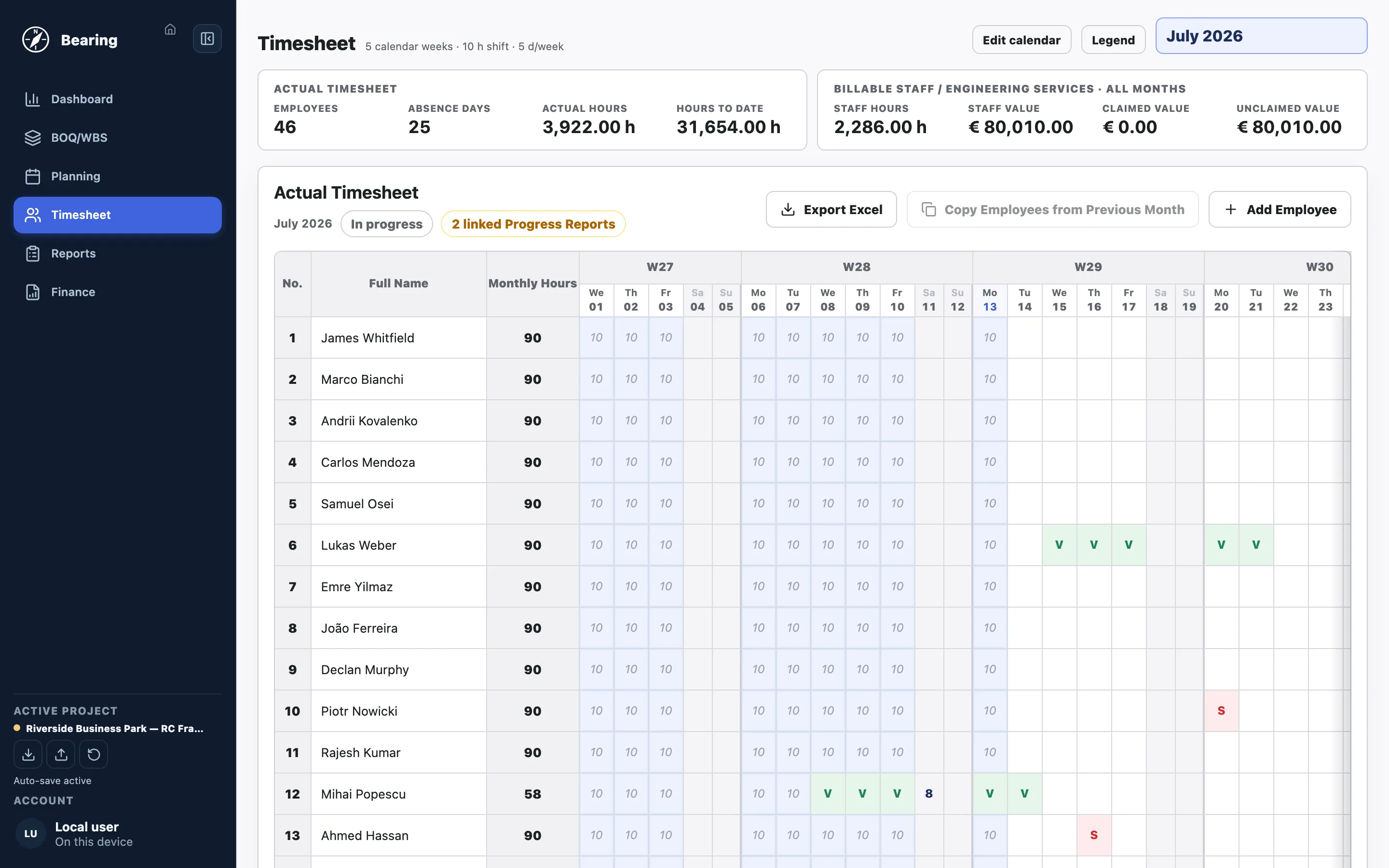
Bearing Timesheet screen: exception-based daily hours for the site crew with absence codes and monthly totals

Timesheet

Daily hours without daily typing.

The standard shift fills itself on working days — the manager only records exceptions: absences, overtime, partial days.

  • Absence codes (sick, vacation, rotation) instead of empty cells
  • Saving a month freezes it as the payroll-grade record
  • Billable staff (site management, HSE, QA/QC) tracked separately from production labour

Background: Timesheets are not progress

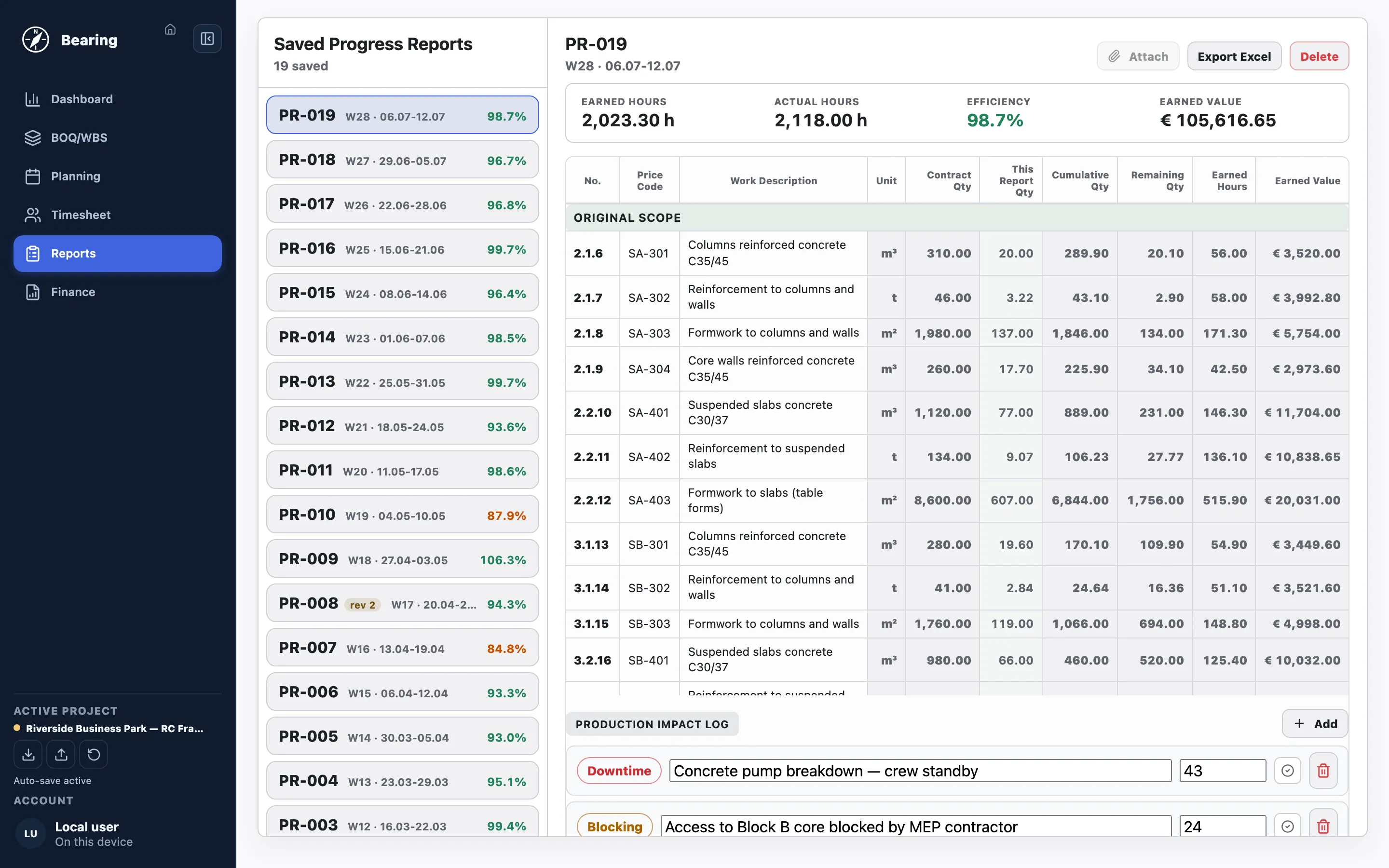
Bearing Reports screen: numbered weekly progress reports with earned hours, actual hours, labour efficiency and a production impact log

Reports

Numbered weekly progress reports.

Every week closes into a numbered report: earned versus actual hours, labour efficiency, and the earned value of the work done.

  • Labour efficiency per week — earned man-hours against the timesheet
  • Production impact log for downtime and blocking, with hours
  • Excel export in a print-ready A4 layout

Background: Earned vs actual hours

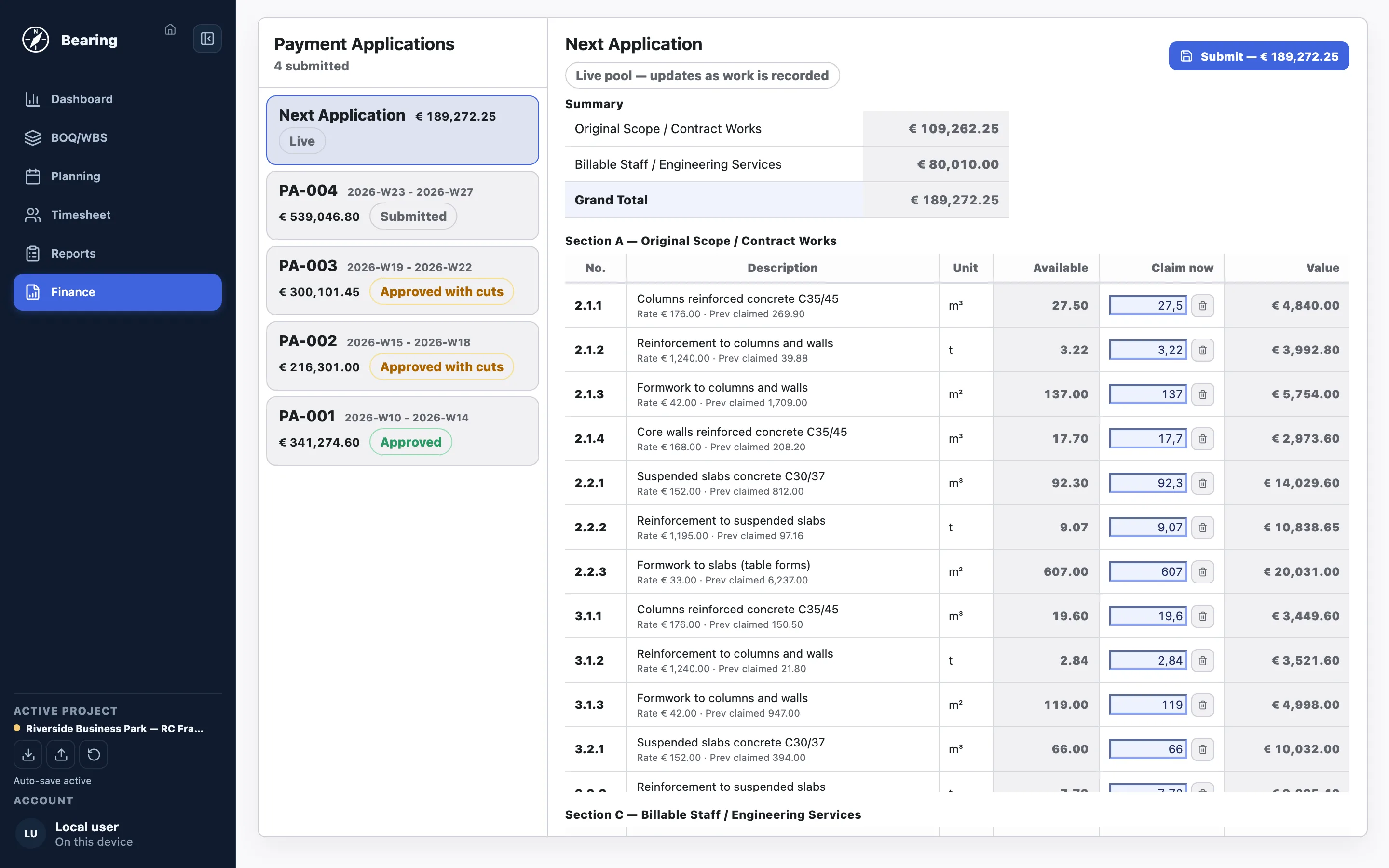
Bearing Finance screen: submitted payment applications with client responses and a live next-application pool ready to submit

Finance

From earned work to certified money.

Progress claims (payment applications) build themselves from saved reports. The live pool always shows what is ready to bill next.

  • Submitted PAs with the client's actual response: approved, approved with cuts, awaiting
  • Cuts carry forward — uncertified quantities stay claimable, never forgotten
  • Billable staff hours claimed alongside contract works

Background: How subcontractors track progress claims

Screens show a fictional demonstration project. All companies, names, and figures are invented.

Designed for controlled onboarding

A cloud workspace for real project teams.

Bearing runs in the browser, stores project data in the cloud, and keeps each client company isolated. Freicore currently onboards companies directly rather than offering anonymous self-service signup.

Data continuity

Operational data remains portable.

Project teams can export and import a project backup in JSON format, supporting controlled handover and recovery alongside cloud persistence.

Bearing access

See whether Bearing fits your project-control process.

Tell us about the contract scope, reporting cycle, labour structure, and commercial workflow you need to control.